Your .env files,
under control.
You already use .env files. Dotvault gives you a proper editor for them, with version history, diffs, and a word when the app is missing an APP_KEY. No accounts, no CLIs, and your secrets don't go anywhere.
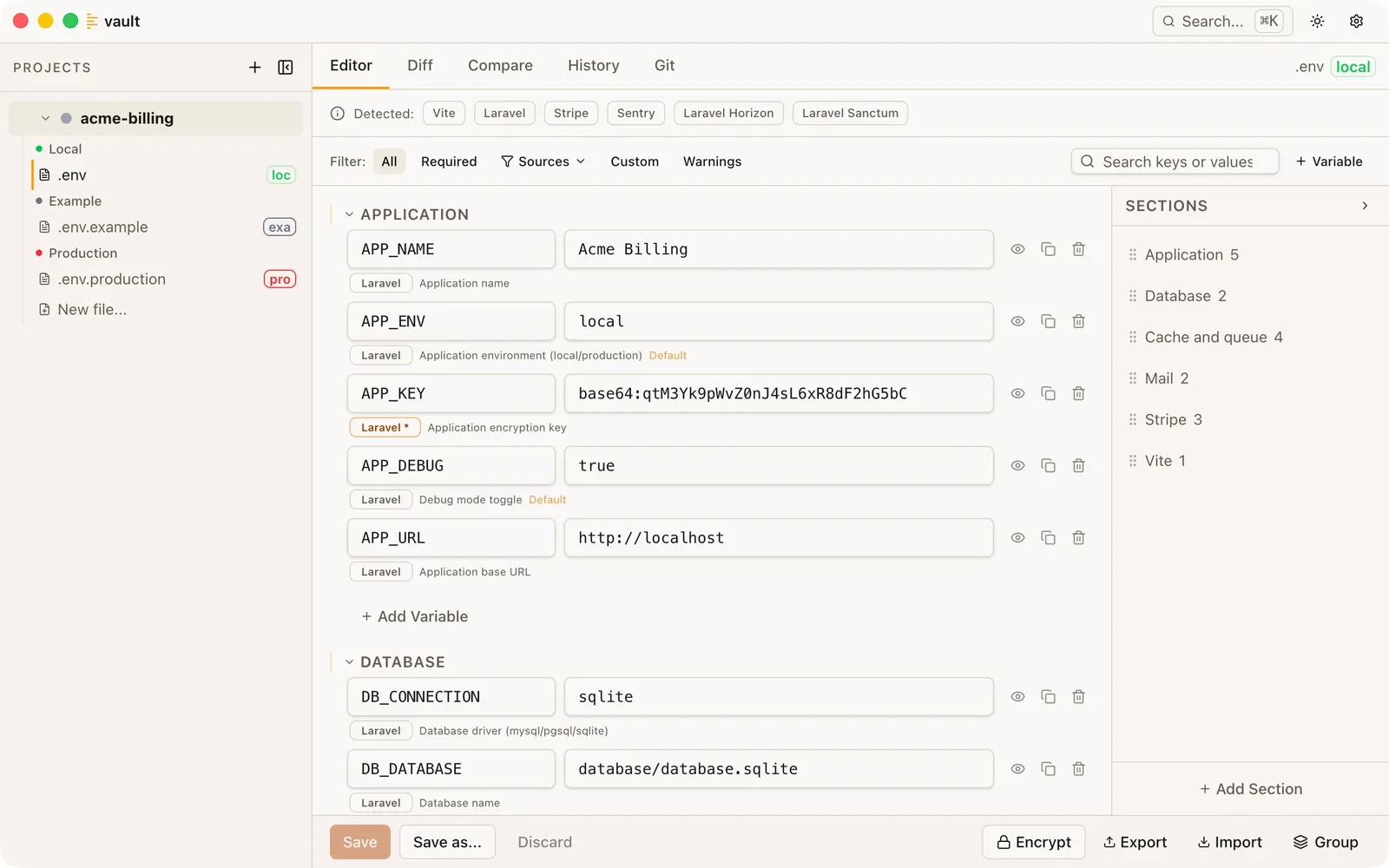
Laravel, Horizon, Sanctum, Stripe, Sentry and Vite detected from composer.json and package.json. Every variable is annotated by what needs it, and APP_KEY is marked required because the app will not boot without it.

Why Dotvault
No new tools. No new workflow. Just less pain.
Zero setup
No account required
No cloud account, no CLI to install, no third-party service to depend on. Buy a licence, open the app, point it at a project folder. Done.
Local-first
Your files stay yours
Secrets are never sent anywhere. No cloud sync, no third-party storage, no account. Snapshot history is encrypted on disk.
Existing workflow
Works with what you already have
A Laravel app is configured by its .env file, and so is everything else you have got open. Dotvault doesn't ask you to change that. It just makes the file considerably less painful to live with.
Features
The whole thing, at a glance.
Everything Dotvault does, in one pass. Compare and diff are easier to show than to describe, so they get real screenshots underneath.
Visual editor
Edit variables in a structured view with sections, comments, and inline annotations. No more squinting at raw text files.
Framework detection
Reads your composer.json and knows what Laravel wants: APP_KEY, the database set, and the packages you've pulled in. It does the same for 20 frameworks and 101 packages across npm, Composer, pip, and gems.
Version history
Every save creates an encrypted snapshot. Browse, compare, and restore any previous version of your env files.
Git integration
Commit history, multi-file staging, inline blame, and diff view. Stage, unstage, and commit env files without leaving the app.
Env sync
Auto-prompts to sync new keys to .env.example on save. Choose keys-only or keys+values, with per-key control.
Search everywhere
Filter variables in the editor, or press ⌘K to search across all projects and files instantly.
Made for Apple Silicon Macs
Signed and notarised by Apple. Checks for a new version when it launches, and only downloads one when you ask. Remembers your window size and position.
Templates
Create new .env files from scratch or from a framework template. Uses .env.example as a basis when available.
Smart warnings
Detects duplicate keys, validates value types, and flags exposed secrets in git-tracked files. Catches mistakes before they cause bugs.
Multi-file compare
See every variable across all your .env files in one matrix. Filter by differences or missing keys, copy values, and spot inconsistencies instantly.
App lock
Lock the app behind Touch ID after a configurable inactivity timeout. Keeps casual eyes off your values when you step away.
Laravel encrypted files
Paste the key once and edit a .env.encrypted file like any other, with no PHP or artisan involved. Encrypting a file, rotating a key and switching formats are all in the encryption guide.
Two worth seeing properly
Every file, side by side.
Compare puts every variable across every file in one matrix, so a key missing from production is obvious rather than discovered at deploy. Diff puts any two files side by side and shows exactly what's different and what's missing between them.
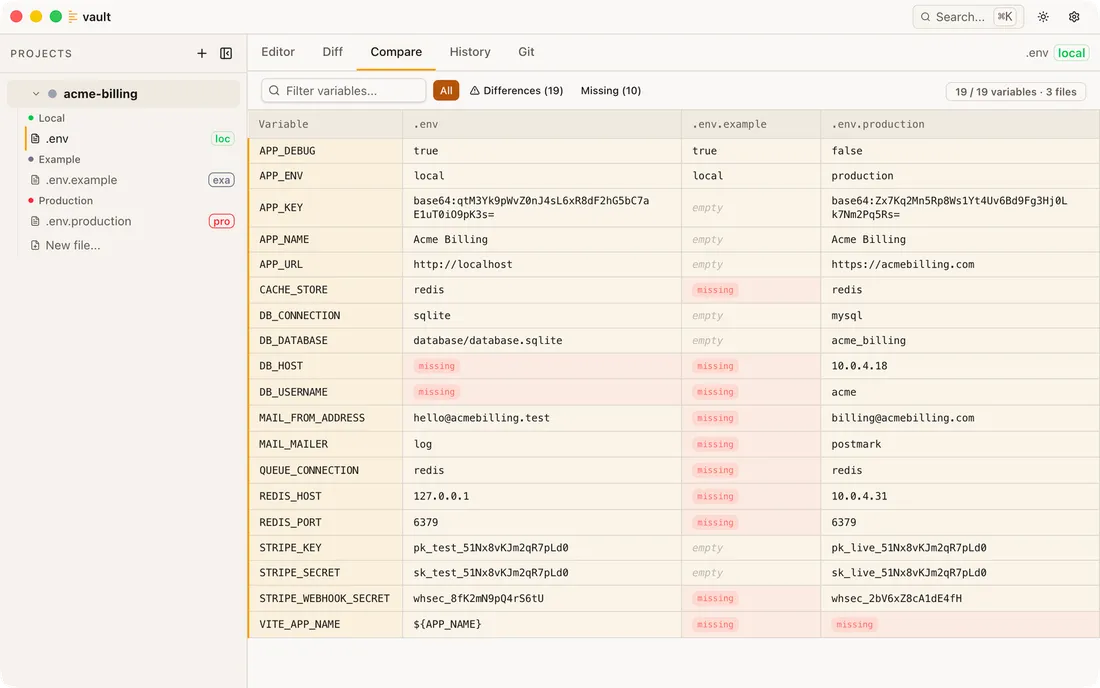
Nineteen variables across three files, with ten missing from at least one of them.
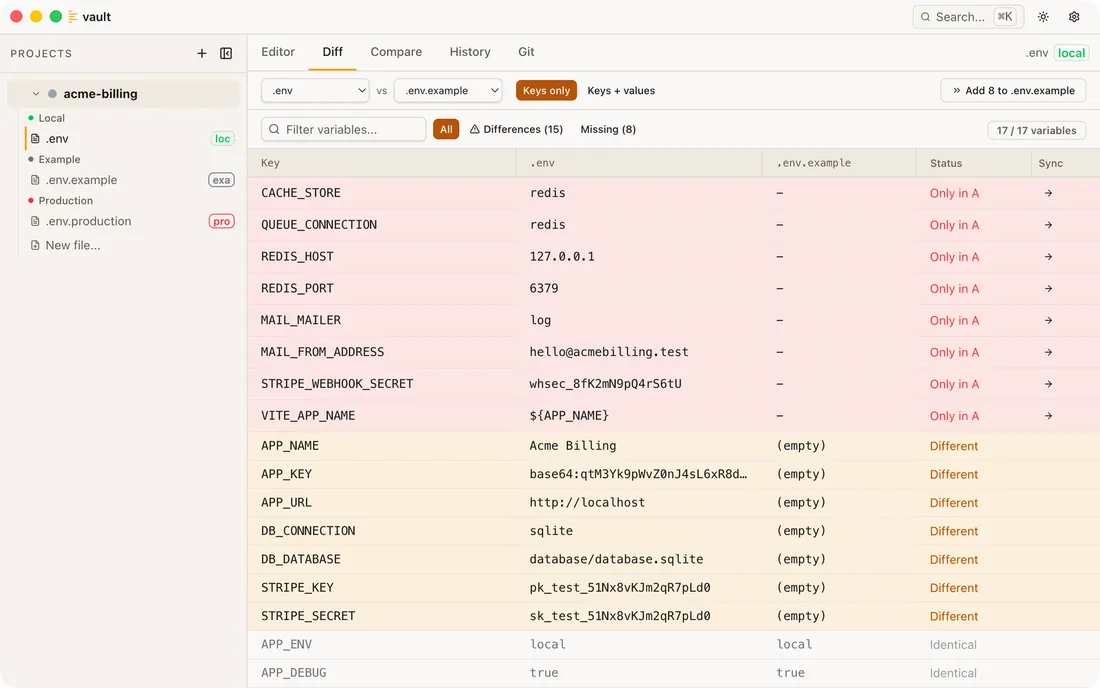
Two files against each other: fifteen differences, eight of them keys missing from .env.example. Sync the missing keys one at a time or all at once, as keys only (safe to commit) or keys and values. Save a file with new keys and Dotvault offers to do the same for .env.example, so you don't have to remember.
Security
Your secrets stay on your machine.
Most tools that manage secrets need to store them somewhere. A cloud account, a synced vault, a third-party server. Dotvault doesn't. Your .env files stay in your project folder where your tooling expects them, and your snapshot history is encrypted at rest on your own machine. No account to compromise, no server to breach.
AES-256-GCM encryption
Every snapshot is encrypted at rest, each with its own initialisation vector. Your .env files themselves stay as plain text, because your framework has to read them.
Keys stay local
Encryption keys are stored via Electron safeStorage, which is protected by the macOS Keychain. They never leave your machine.
No cloud sync
No account, no vault, no server holding your secrets. The app does check for updates and revalidate your licence, and optional anonymous telemetry is off by default. Every request it makes is listed here.
Read the full security detail, including what Dotvault deliberately does not protect you from.
Pricing
Buy it once. It stays bought.
The key never expires. Updates run for twelve months, and when that window closes the copy you own carries on working exactly as it did.
Solo
$49
1 developer · 2 machines
Buy Solo$25 a year for updates after the first twelve months. Optional.
Team (5)
$179
5 developers · 10 machines
Buy Team (5)$99 a year for updates after the first twelve months. Optional.
Team (10)
$299
10 developers · 20 machines
Buy Team (10)$169 a year for updates after the first twelve months. Optional.
- Unlimited projects and
.envfiles - Visual diff and version history
- Framework templates and
.env.examplesync
Buying for a team
One purchase, one key, and nothing to administer. No invites to send, no seats to assign and nobody queuing for the company card. Hand the key to your developers and they are working. If someone leaves and their Mac goes with them, free that activation from the Lemon Squeezy portal linked in your purchase email.
What it isn't
It is not a shared secrets manager. There is no sync, no team vault and no server holding your values. Your .env files stay in your repos and on your machines, which is the whole point of the app. What the team licence buys is the tool, once, for everyone.
Regional pricing
The price is set for Western salaries. If that puts it out of reach where you live, send me a note and I'll sort you out with a code. It is handled by hand, so there is no location-sniffing script on this site and no code sitting on a coupon board.
Payment and refunds
No account to create. Lemon Squeezy takes the payment as merchant of record, so your card details go to them and never reach me. Full refund within 14 days if it turns out not to be for you.
Open-source maintainers
If you maintain something other developers depend on, and you do it in your own time rather than on a company's payroll, Dotvault is free. Here's the rule, and how to ask. There's no requirement attached: no tweet, no review, no backlink and no public thank you. If the app is good enough to talk about then you'll talk about it, and if it isn't, a bought mention wouldn't have saved it.
FAQ
Common questions.
Quick answers for the things people ask most.
Are my secrets safe?
Yes. Snapshots are encrypted with AES-256-GCM, using a key held via Electron safeStorage and protected by your macOS Keychain. Your .env file contents, variable names, and values are never sent anywhere. Optional anonymous usage telemetry (off by default) only sends feature usage signals, never keys, values, or file contents. Full detail on the security page, including every network request the app makes.
Is Dotvault an Electron app?
Yes, and you would find that out in thirty seconds anyway. Electron is the reason one person can ship an editor, a diff view, a comparison grid and a git panel that all work; what it costs you is memory. Nothing sensitive happens in the window. File access, encryption and git all run in Node behind it, which is also where Laravel's encrypted format is reimplemented so you never need PHP. I did rebuild the whole thing natively in Swift once, get it close to parity, and delete it — that story is here, and the short version of the trade-off is here.
Do I need an account to buy or to use it?
No, neither. Dotvault is a standalone macOS app with a one-time licence key: no cloud account to create, no CLI to install, no ongoing service to depend on. Buying goes through Lemon Squeezy, who act as merchant of record and hold your name, email address and card details for the transaction. What comes back to me is your name, email and licence details, never your card. Enter your key, point it at a project folder, and you're working.
What happens when my twelve months of updates end?
Nothing you'd notice on the day. Every tier includes twelve months of updates, and when that window closes the copy you have carries on working exactly as it did. You just stop receiving new releases until you renew. The licence key itself never expires, so there is no lock, no read-only mode, and no nagging.
Can I renew after leaving it a while?
Yes. Your licence doesn't lapse while you wait, so there's nothing to reactivate and nothing stops working in the meantime. There's no new key either: you buy a renewal and the date on the licence you already have moves. Nothing to paste, nothing to swap over. If you've left a gap, the twelve months run from the day you renew rather than from the day the old window closed, so waiting costs you nothing beyond the releases you skipped. Renew early and it's added to the end of what you've got, so that costs you nothing either.
How do the team seats work?
Team (5) is sold for five developers and Team (10) for ten. Every tier gives two machines per developer, so Team (5) activates on ten machines and Team (10) on twenty. It's one licence key you share with your team rather than an invite system, so there are no seats to administer. If someone leaves and their Mac goes with them, free that activation up from the Lemon Squeezy customer portal linked in your purchase email. What it doesn't buy is a shared secrets manager: there's no sync and no team vault, and everyone's .env files stay in their own repos and on their own machines.
What happens if you stop developing Dotvault?
The app carries on working. Your licence lives on your machine, and the weekly check with the licensing server can fail forever without anything being taken away, so a shut-down store or a bus with my name on it doesn't lock you out of your own secrets. Your .env files are ordinary files on your disk that you could open in any editor, which is deliberate. The one thing that would stop is activating a brand new machine, since that does need Lemon Squeezy to answer.
Why is Dotvault Apple Silicon only?
Apple is ending Intel support in macOS 27, and carrying a second architecture I could not test properly on every release would have been worse than not carrying it. If you're on an Intel Mac, the trial is the free way to confirm this isn't for you. If you already have Dotvault on one, it keeps working — it just stops finding updates. An Apple Silicon build won't run on an Intel Mac at all — Rosetta translates in the other direction only, so there's no coaxing it. Why I made the call when I did, and what it means for you.
What happens when I move to a new Mac?
Your licence moves with you: every tier allows two machines per developer, and deactivating an old machine frees the slot immediately. Snapshot history is the awkward part — it's encrypted with a key that stays on the machine that made it, so a fresh install starts with an empty History tab. Your .env files are untouched either way. The full answer, including what survives a Migration Assistant move.
Does Dotvault work with monorepos?
Yes, with one thing to know first: a project is a single folder and the scan isn't recursive, so a monorepo with three packages is three projects in the sidebar rather than one. Search works across all of them; the comparison grid works within one. What that's like in practice.
What file formats are supported?
Standard .env files: anything named .env or starting with .env (e.g., .env.local, .env.production). Each line should be KEY=value format. Comments and blank lines are preserved.
How do snapshots work?
Every time you save a file, Dotvault creates an encrypted snapshot. You can browse, compare, and restore any previous version from the History tab. An initial snapshot is captured automatically the first time you open a file.
How does framework detection work?
Dotvault scans your project's package.json, composer.json, Gemfile, requirements.txt, and pyproject.toml to identify frameworks and packages. 121 are recognised across npm, Composer, pip, and gem ecosystems.
What does .env.example sync do?
After saving a .env file, Dotvault checks if any keys are missing from .env.example. You get a prompt to selectively add them: keys-only (safe for git) or keys+values.
What keyboard shortcuts are available?
Cmd+S to save, Cmd+Z to undo, Cmd+Shift+Z to redo, Cmd+K for cross-project search. Open Help → Keyboard Shortcuts for the full list.
Can I open a project in my terminal or editor?
Yes. Right-click any project in the sidebar for Open in Finder, Terminal, or Editor. Set your preferred apps in Settings.
There are more answers in the help centre, including the ones people ask before buying.
Download
Download Dotvault
Free 14-day trial with every feature unlocked. macOS only, no account to create and no card to hand over.
On day 15 Dotvault asks for a licence key and won't open your files until it has one. Your .env files are left exactly where they are, untouched, and you can still open them in any editor. Nothing is held hostage.
Apple Silicon, macOS 13 Ventura or later. No account to create, and the licence is a one-time purchase.
Version 1.6.1, released . See what's changed.